HttpClient,httpclient应用场景扫描支付、查看地图、获取验证码、查看天气等功能
HttpClient的maven坐标:
- <dependency>
- <groupId>org.apache.httpcomponents</groupId>
- <artifactId>httpclient</artifactId>
- <version>4.5.13</version>
- </dependency>
HttpClient的核心API: HttpClient:Http客户端对象类型,使用该类型对象可发起Http请求。 HttpClients:可认为是构建器,可创建HttpClient对象。 CloseableHttpClient:实现类,实现了HttpClient接口。 HttpGet:Get方式请求类型。 HttpPost:Post方式请求类型。
HttpClient发送请求步骤:
入门案例对HttpClient编程工具包有了一定了解后,那么,我们使用HttpClient在Java程序当中来构造Http的请求,并且把请求发送出去,接下来,就通过入门案例分别发送GET请求和POST请求,具体来学习一下它的使用方法。 1.2.1 GET方式请求正常来说,首先,应该导入HttpClient相关的坐标,但在项目中,就算不导入,也可以使用相关的API。 因为在项目中已经引入了aliyun-sdk-oss坐标: - <dependency>
- <groupId>com.aliyun.oss</groupId>
- <artifactId>aliyun-sdk-oss</artifactId>
- </dependency>
上述依赖的底层已经包含了HttpClient相关依赖。
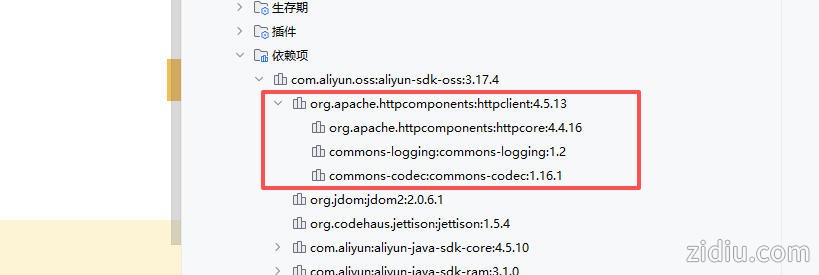
案例测试:
- package com.zidiu;
-
- import org.apache.http.HttpEntity;
- import org.apache.http.client.methods.CloseableHttpResponse;
- import org.apache.http.client.methods.HttpGet;
- import org.apache.http.impl.client.CloseableHttpClient;
- import org.apache.http.impl.client.HttpClients;
- import org.apache.http.util.EntityUtils;
- import org.junit.jupiter.api.Test;
- import org.springframework.boot.test.context.SpringBootTest;
-
- @SpringBootTest
- public class HttpClientTest {
-
- /**
- * 测试通过httpclient发送GET方式的请求
- */
- @Test
- public void testGET() throws Exception{
- //创建httpclient对象
- CloseableHttpClient httpClient = HttpClients.createDefault();
-
- //创建请求对象
- HttpGet httpGet = new HttpGet("http://localhost:8080/user/shop/status");
-
- //发送请求,接受响应结果
- CloseableHttpResponse response = httpClient.execute(httpGet);
-
- //获取服务端返回的状态码
- int statusCode = response.getStatusLine().getStatusCode();
- System.out.println("服务端返回的状态码为:" + statusCode);
-
- HttpEntity entity = response.getEntity();
- String body = EntityUtils.toString(entity);
- System.out.println("服务端返回的数据为:" + body);
-
- //关闭资源
- response.close();
- httpClient.close();
- }
- }
源代码运行输出结果如下:
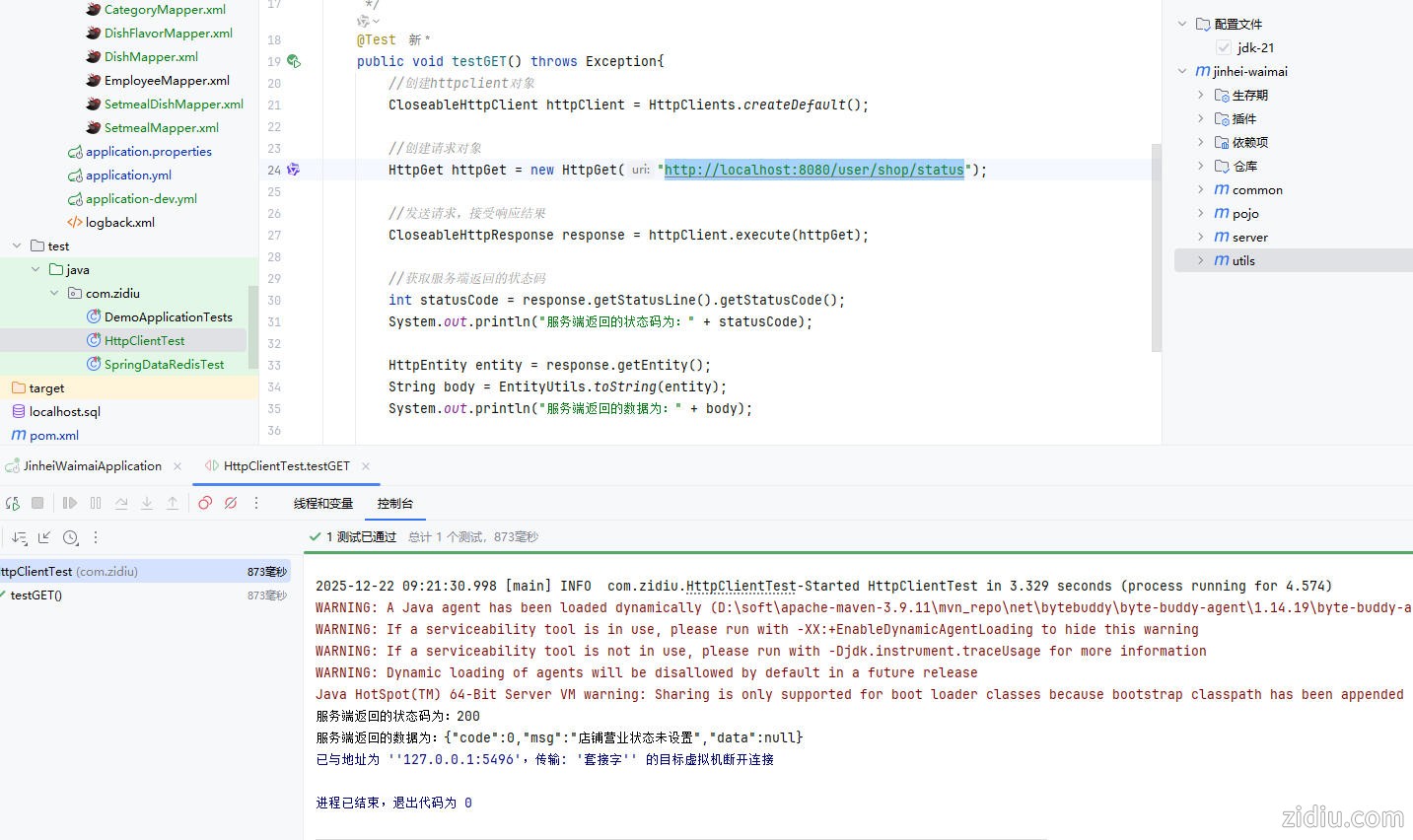
1.2.2 POST方式请求在HttpClientTest中添加POST方式请求方法,相比GET请求来说,POST请求若携带参数需要封装请求体对象,并将该对象设置在请求对象中。 实现步骤: 创建HttpClient对象 创建请求对象 发送请求,接收响应结果 解析响应结果 关闭资源
- /**
- * 测试通过httpclient发送POST方式的请求
- */
- @Test
- public void testPOST() throws Exception{
- // 创建httpclient对象
- CloseableHttpClient httpClient = HttpClients.createDefault();
-
- //创建请求对象
- HttpPost httpPost = new HttpPost("http://localhost:8080/admin/employee/login");
-
- JSONObject jsonObject = new JSONObject();
- jsonObject.put("username","admin");
- jsonObject.put("password","123456");
-
- StringEntity entity = new StringEntity(jsonObject.toString());
- //指定请求编码方式
- entity.setContentEncoding("utf-8");
- //数据格式
- entity.setContentType("application/json");
- httpPost.setEntity(entity);
-
- //发送请求
- CloseableHttpResponse response = httpClient.execute(httpPost);
-
- //解析返回结果
- int statusCode = response.getStatusLine().getStatusCode();
- System.out.println("响应码为:" + statusCode);
-
- HttpEntity entity1 = response.getEntity();
- String body = EntityUtils.toString(entity1);
- System.out.println("响应数据为:" + body);
-
- //关闭资源
- response.close();
- httpClient.close();
- }
完全代码如下:
- package com.zidiu;
-
- import com.alibaba.fastjson.JSONObject;
- import org.apache.http.HttpEntity;
- import org.apache.http.client.methods.CloseableHttpResponse;
- import org.apache.http.client.methods.HttpGet;
- import org.apache.http.client.methods.HttpPost;
- import org.apache.http.entity.StringEntity;
- import org.apache.http.impl.client.CloseableHttpClient;
- import org.apache.http.impl.client.HttpClients;
- import org.apache.http.util.EntityUtils;
- import org.junit.jupiter.api.Test;
- import org.springframework.boot.test.context.SpringBootTest;
-
- @SpringBootTest
- public class HttpClientTest {
-
- /**
- * 测试通过httpclient发送GET方式的请求
- */
- @Test
- public void testGET() throws Exception{
- //创建httpclient对象
- CloseableHttpClient httpClient = HttpClients.createDefault();
-
- //创建请求对象
- HttpGet httpGet = new HttpGet("http://localhost:8080/user/shop/status");
-
- //发送请求,接受响应结果
- CloseableHttpResponse response = httpClient.execute(httpGet);
-
- //获取服务端返回的状态码
- int statusCode = response.getStatusLine().getStatusCode();
- System.out.println("服务端返回的状态码为:" + statusCode);
-
- HttpEntity entity = response.getEntity();
- String body = EntityUtils.toString(entity);
- System.out.println("服务端返回的数据为:" + body);
-
- //关闭资源
- response.close();
- httpClient.close();
- }
-
- /**
- * 测试通过httpclient发送POST方式的请求
- */
- @Test
- public void testPOST() throws Exception{
- // 创建httpclient对象
- CloseableHttpClient httpClient = HttpClients.createDefault();
-
- //创建请求对象
- HttpPost httpPost = new HttpPost("http://localhost:8080/admin/employee/login");
-
- JSONObject jsonObject = new JSONObject();
- jsonObject.put("username","admin");
- jsonObject.put("password","123456");
-
- StringEntity entity = new StringEntity(jsonObject.toString());
- //指定请求编码方式
- entity.setContentEncoding("utf-8");
- //数据格式
- entity.setContentType("application/json");
- httpPost.setEntity(entity);
-
- //发送请求
- CloseableHttpResponse response = httpClient.execute(httpPost);
-
- //解析返回结果
- int statusCode = response.getStatusLine().getStatusCode();
- System.out.println("响应码为:" + statusCode);
-
- HttpEntity entity1 = response.getEntity();
- String body = EntityUtils.toString(entity1);
- System.out.println("响应数据为:" + body);
-
- //关闭资源
- response.close();
- httpClient.close();
- }
- }
| 
 |Archiver|自丢网
( 粤ICP备2024252464号-1 )
|Archiver|自丢网
( 粤ICP备2024252464号-1 )



 发表于 2025-12-22 09:22:38